

Picture this: a paid search campaign goes live on a Monday morning, a SaaS renewal hits the same card two days later, and by Friday the finance person is staring at a spreadsheet trying to figure out which charge belongs to which budget line. Nobody labeled the card. Nobody set a limit. The card that was supposed to cover one campaign has quietly been absorbing tool renewals, a freelancer payment, and three platform fees that nobody authorized. It is an incredibly common mess, and it usually starts with one shared corporate card doing too many jobs at once.
This is why marketing teams started paying attention to virtual cards — not as a novelty, but as an operational fix. Search volume around payment controls has grown alongside the explosion of ad platforms and SaaS subscriptions, and terms like foreign virtual card application show up regularly as marketers try to understand their options across different banking relationships and geographies. The core appeal is straightforward: instead of one physical card that touches everything, you issue purpose-built virtual cards for specific uses, with limits and rules baked in.
Virtual cards are not magic. They do not replace the need for process, clear ownership, or accounting discipline. But when used correctly, they give marketing teams something genuinely useful: granular control over where money goes, how much can be spent, and what happens when something goes wrong. This guide covers the practical side — safety, spend tracking, fraud prevention, team permissions, and what to think about when crossing into cross-border payment territory.
What Virtual Cards Are
A virtual card is a card number — with an expiry date and CVV — that exists digitally and is typically linked to an underlying account or credit facility. It has no physical form. You generate it through a banking platform, a fintech provider, or a corporate card program, and you use it anywhere that accepts card payments online.
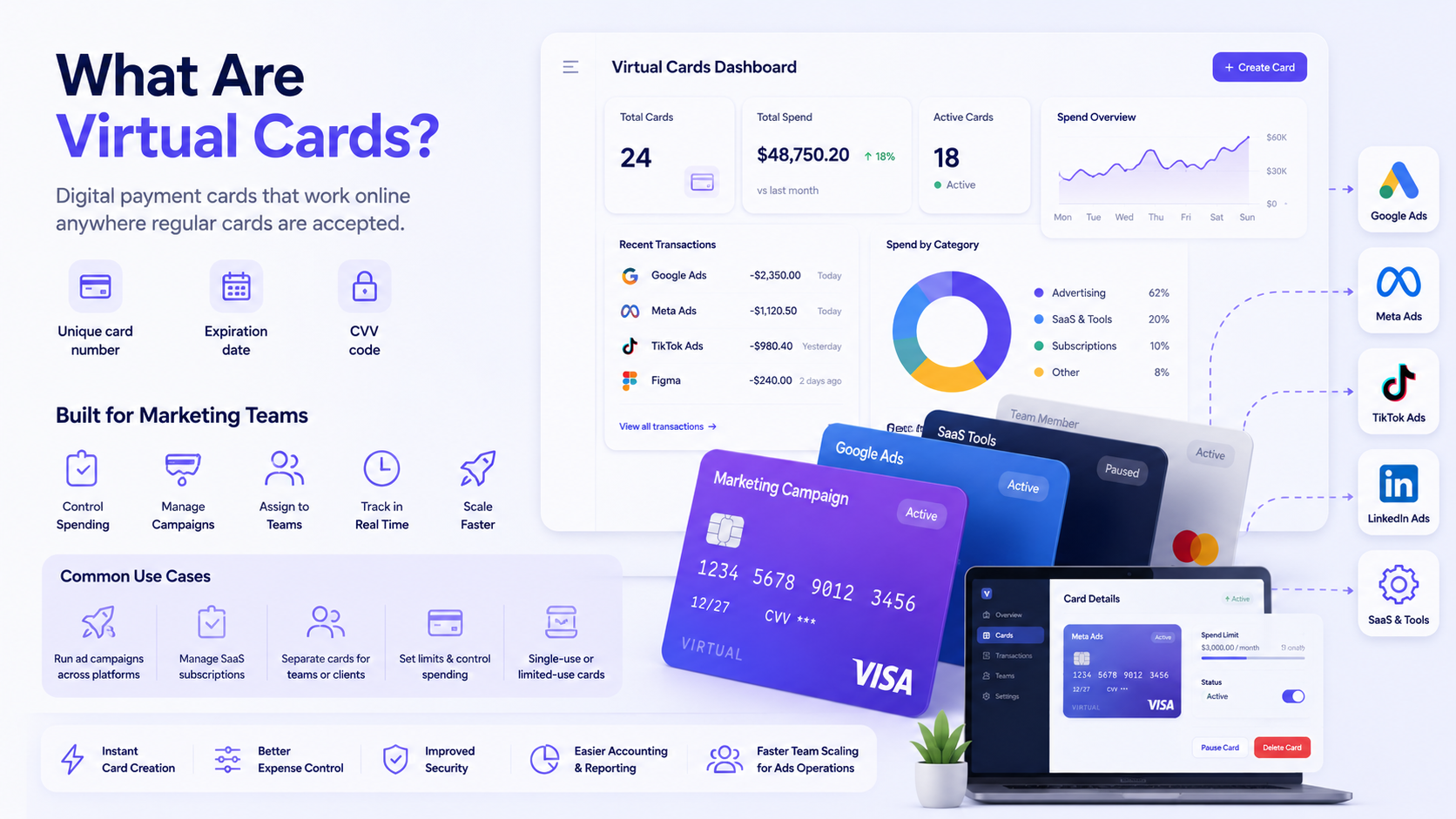
The more important distinction is in how they are configured. Single-use virtual cards are generated for one transaction and expire immediately after — useful for one-off vendor payments or situations where you want zero ongoing exposure. Recurring-use cards stay active for a defined period and are the right tool for ongoing subscriptions or ad platform billing. Some providers let you lock a card to a specific merchant, so it will only authorize charges from, say, Google Ads or Adobe — and nothing else. Others let you create team cards that individual employees can use within set limits, or campaign-specific cards that are tied to a particular budget.
The difference from a physical corporate card matters in practice. A physical card is hard to cancel without disrupting everything attached to it. A virtual card can be frozen, replaced, or deleted in seconds, without affecting other cards or other vendors. That single property — easy isolation and replacement — is the reason they became standard equipment for anyone managing serious ad spend or a large portfolio of SaaS subscriptions.
Why Marketers Use Them
The use cases spread across almost everything a marketing team pays for. Ad platforms bill aggressively — they retry failed payments automatically, sometimes at inconvenient moments, and they can pause campaigns if a card declines. SaaS tools renew quietly. Freelancers and contractors need to be paid without handing them access to a main company card. Design software, analytics platforms, influencer tools, SEO subscriptions — the list of recurring charges in a typical marketing stack is longer than most people realize until they sit down and count.
Virtual cards give teams a way to create financial boundaries around each of these categories. One card for paid search. One for paid social. A separate card for each major SaaS platform. A short-lived card for a campaign test that should never recur. The structure prevents charges from bleeding across budget lines and makes reconciliation dramatically easier at month end.
- Meta Ads and Instagram paid campaigns
- Google Ads and Performance Max campaigns
- LinkedIn and Twitter/X paid promotion
- TikTok Ads and programmatic display
- Monthly SaaS subscriptions (SEO tools, analytics, CRM, design platforms)
- One-off freelancer or contractor payments
- A/B testing tools and conversion rate optimization software
- Email marketing and automation platforms
- Stock image and creative asset subscriptions
- Influencer platform fees and creator payments
- Short-term campaign budget tests before scaling
Spend Control
The control features are where virtual cards earn their keep. Setting a spending limit on a card is obvious — but the more useful controls are the ones that prevent specific categories of overspend before they happen. Merchant category locks mean a card issued for Google Ads will simply decline if someone tries to use it at a different vendor. That is not bureaucracy; that is a card that cannot accidentally absorb a charge it was never meant to cover.
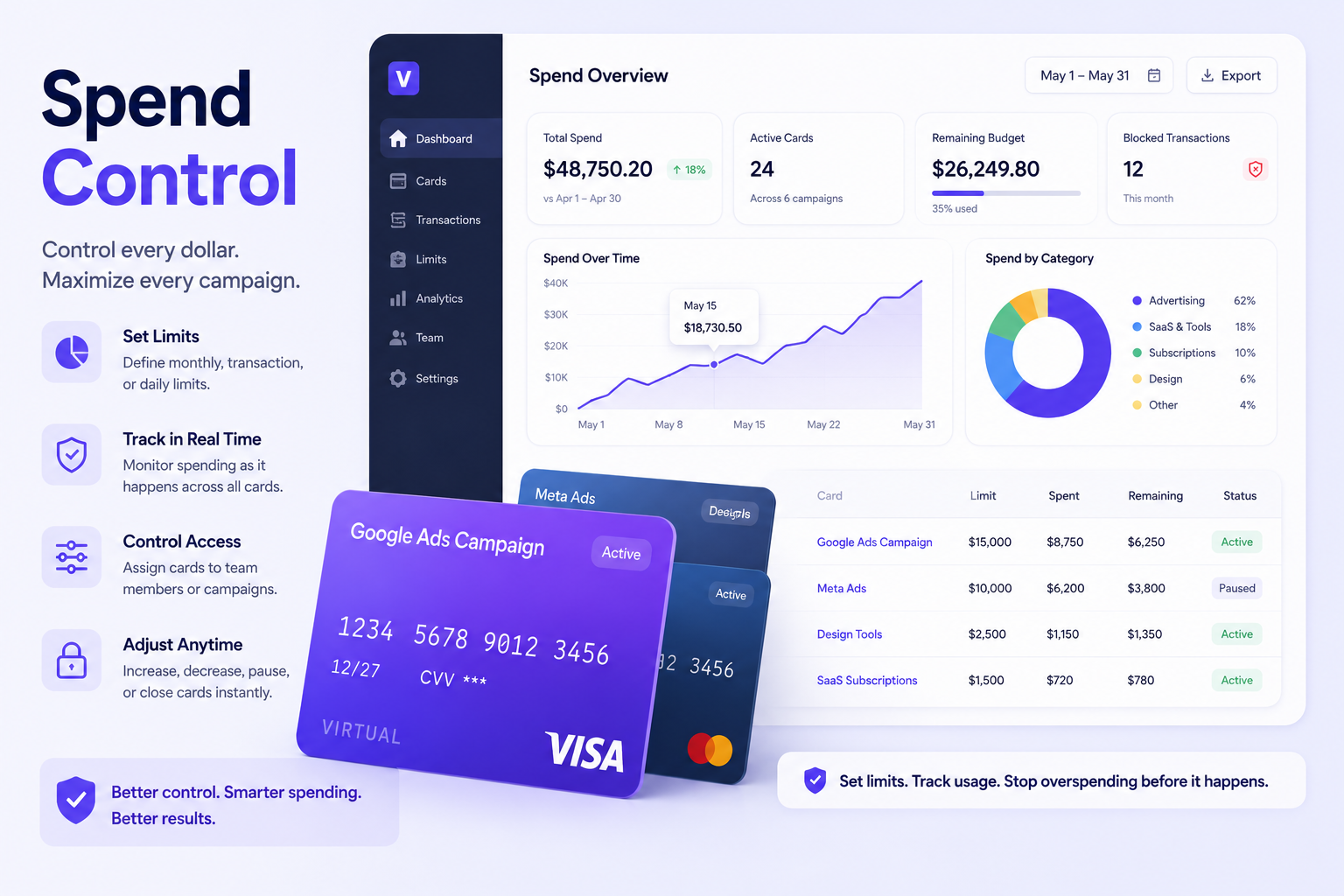
Expiry dates on campaign cards are underused. If you create a virtual card for a specific campaign that runs for six weeks, set it to expire when the campaign ends. That card then cannot be used again — even if the number is somehow captured or stored — without someone actively issuing a new one. It forces intentionality. The same logic applies to trial subscriptions: issue a card, let the trial run, and if you decide not to continue, let the card expire rather than relying on remembering to cancel manually.
Approval flows matter too. Some platforms let you require a manager to approve before a new card is created or a limit is raised. For agencies or larger in-house teams, that single gate catches a surprising number of would-be shadow subscriptions.
| Control Feature | What It Prevents | Best Use Case | Common Mistake |
|---|---|---|---|
| Spending limit | Budget overruns from aggressive platform billing | Campaign-level ad budgets | Setting it too high “just in case” |
| Merchant lock | Unauthorized use at unintended vendors | Single-platform ad spend cards | Leaving the merchant field open |
| Expiry date | Zombie subscriptions and forgotten trials | Trial-to-paid SaaS tools | Not setting expiry on campaign cards |
| Approval flow | Shadow spend and unauthorized card creation | Agencies with junior buyers | Giving everyone admin access |
| Instant freeze | Continued charges after a suspected compromise | Any card showing unexpected activity | Waiting to investigate before freezing |
Tracking Ad Spend
Campaign-level tracking is where the operational payoff becomes obvious. When every campaign has its own virtual card, the card statement is itself a budget report. You do not need to manually tag transactions or parse a mixed statement to figure out what went where. The card named “Q3 Paid Search — Google” only ever has Google Ads charges on it. The card named “Q3 Social — Meta” only has Meta charges. The separation is built into the payment infrastructure, not bolted on afterward.
Naming conventions matter more than most teams realize. A card called “Card 4” tells you nothing three months later. A card called “SEO Tools — Ahrefs + Semrush — 2025” tells you everything. Label cards the way you would label a folder: specific enough to be useful, consistent enough to make month-end review fast. Most virtual card platforms let you add notes or reference tags as well, which can map directly to cost centers or project codes in your accounting system.
Monthly review routines close the loop. Assign someone — ideally someone in finance or ops, not the person who authorized the spend — to run through active cards once a month. Check for cards that have not been used in 60 days. Look for any charges that do not match the card’s stated purpose. Flag anything that auto-renewed without a corresponding budget approval. It sounds like extra work, but in practice it takes under an hour and catches problems that would otherwise quietly accumulate for quarters.
SaaS Payments
SaaS subscription sprawl is a real problem for marketing teams, and it is almost always worse than anyone admits. Tools get added during a campaign or a hiring push, the project ends, but the subscription does not. The original person who signed up leaves the company. Nobody else knows the login. The card keeps getting charged. This scenario plays out constantly, and it costs teams real money — often for tools nobody is actively using.
The structural fix is to issue a dedicated virtual card for each significant SaaS vendor, with a spending limit that matches the expected subscription cost. When a charge comes through that is higher than the limit — say, a tool upgraded its pricing tier automatically — the card declines and creates a notification rather than silently absorbing the difference. That friction is a feature, not a bug.
- Assign one card per SaaS vendor, not one card for all SaaS
- Set card limits to match the known subscription price, not a generous buffer
- Use expiring cards for free trials — let them expire rather than canceling manually
- Review the full list of active SaaS cards quarterly; cancel anything unused
- Document the owner and purpose of every SaaS card in a shared register
- Check renewal dates before each billing cycle and decide whether to continue
- Never use a shared team card for SaaS — individual cards create individual accountability
- Flag annual renewals a month in advance so budget owners can approve or cancel
Fraud Prevention
Virtual cards significantly reduce fraud exposure because compromising one card does not compromise your entire payment infrastructure. If a card number is skimmed, leaked in a data breach, or captured via a compromised vendor system, the damage is bounded by that card’s limit and merchant restrictions. You freeze it, replace it, and the rest of your operation continues without interruption. With a single physical corporate card, that cleanup process is far messier — you have to update every vendor, every subscription, every platform at once.
Ad platforms are a specific fraud vector worth taking seriously. Fraudulent charges on ad accounts — whether from account takeovers, billing glitches, or unauthorized campaigns run by bad actors — can scale quickly before anyone notices. A card with a hard spending limit on a specific platform caps the maximum damage. It will not stop a determined attacker from getting into the ad account itself, but it limits what they can charge.
The human process side matters as much as the card controls. Alerts for declined transactions, unusual charges, or new vendor attempts need to go somewhere — and someone needs to act on them. A card that freezes automatically on suspicious activity is useful; a card that freezes and nobody checks the alert for two weeks is not.
| Risk | How It Happens | Virtual Card Control | Human Process Needed |
|---|---|---|---|
| Card number theft | Vendor data breach or skimming | Instant freeze and card replacement | Audit recent charges before replacement |
| Ad account overspend | Platform billing error or account compromise | Hard spending cap on platform card | Monitor ad account access separately |
| Subscription creep | Trials converting, renewals auto-processing | Expiring cards, merchant-locked cards | Monthly review of active subscriptions |
| Internal misuse | Employee uses team card for personal purchases | Merchant category restriction | Role-based card issuance and approval flows |
For more context on card-level payment security standards, the PCI Security Standards Council publishes guidance relevant to anyone handling card-based payment flows, including teams managing high-volume ad platform billing.
Team Permissions
Card controls only work if the people using them have clear, defined roles. Who can create a new card? Who can raise a spending limit? Who can freeze a card? These questions sound administrative, but the answers determine whether your controls actually hold or whether they are routinely bypassed by whoever finds them inconvenient.
For a small agency, a sensible structure might be: account managers can request cards, but only an ops or finance lead can approve and issue them. Limits can be raised by the same finance lead, with a written request attached. Anyone can freeze a card immediately if they suspect a problem — but only the finance lead can unfreeze it. That structure adds maybe two to three minutes of friction per card request, and it prevents a lot of quiet accumulation of unauthorized spend.
In-house teams often struggle with this because marketers see card creation as a speed issue. A campaign is live, a tool is needed, the procurement process feels slow. The answer is not to remove controls — it is to make the approval process fast enough that people do not route around it. Pre-approved card templates for common use cases help. So does setting a low-friction card creation flow for routine spend categories, while keeping tighter gates on anything above a certain threshold.
Cross-Border Payments
International SaaS tools and global ad platforms are a normal part of how marketing teams operate, and cross-border payments through virtual cards are generally straightforward when the underlying account relationship is legitimate, properly documented, and compliant with local regulations. The wrinkles tend to appear at the banking and compliance layer rather than the card layer itself.
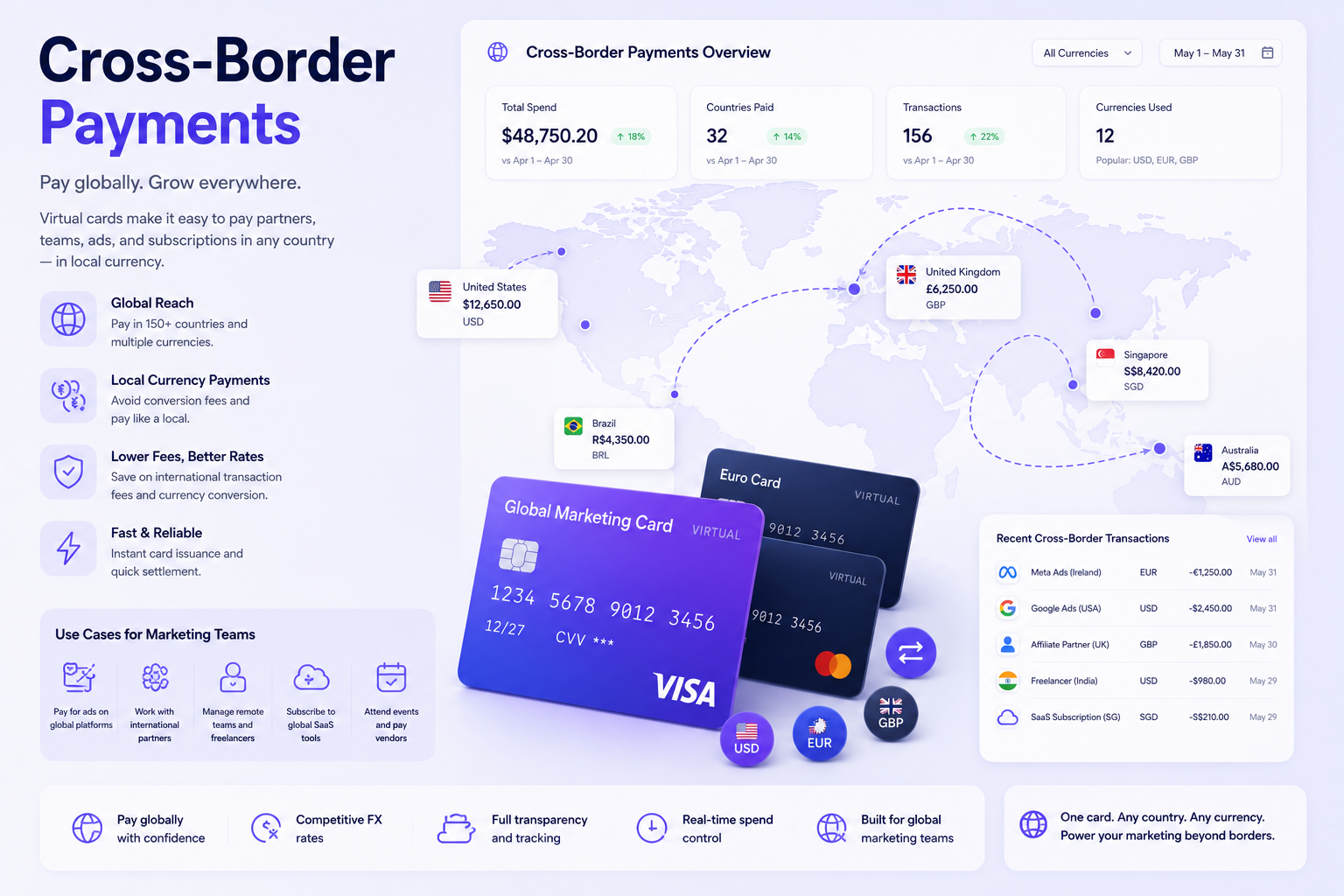
Currency conversion fees vary significantly between providers. A card that looks free may be quietly charging 1.5–3% on every foreign currency transaction — which adds up fast when you’re running campaigns billed in USD, EUR, and GBP simultaneously. Ask specifically about FX markup before choosing a provider for international ad spend.
On the regulatory side, questions about foreign banking relationships — including searches like how to issue a virtual card from a foreign bank in Russia — reflect the real complexity that teams in jurisdictions with constrained banking access face. This is a legitimate area of research, but any cross-border card or foreign account arrangement needs to be evaluated against local financial regulations, international sanctions compliance, the platform’s own terms of service, and proper tax and accounting treatment. What is permissible varies considerably by country and by the specific bank or fintech involved. The right starting point is always a qualified local legal or financial advisor, not a workaround.
Documentation matters for cross-border payments. Keep clear records of which entity holds the card, in what currency, under which regulatory regime, and for what business purpose. Platforms increasingly ask about payment source and beneficial ownership; having clean records protects you in disputes and during audits.
Accounting and Reconciliation
The accounting payoff of a well-structured virtual card setup is real, but only if the data discipline is there. A card named correctly, with the right tags and a consistent owner, closes the loop between a payment and the budget line it came from. A card with no name, no tags, and three different people who might know what it was for is a problem waiting for month-end.
Finance teams need a monthly capture routine that is specific and consistent. The goal is that any charge should be traceable — within a few minutes — to a campaign, a cost center, a business purpose, and a budget owner.
- Card name and stated purpose
- Card owner (person responsible for that spend category)
- Vendor name and service description
- Amount and currency, including any FX conversion
- Campaign or project code it maps to
- Invoice or receipt reference number
- Whether the charge was expected or a surprise
- Renewal date if applicable
- Whether the card/subscription is still active or should be canceled
- Notes on any disputed or unrecognized charges
Choosing a Provider
The virtual card provider market has grown significantly in the past few years, and the feature sets vary more than the marketing copy suggests. A few things to compare seriously: card issuance speed, spending controls (limits, merchant locks, expiry), multi-currency support, integration with accounting software, team permission structures, and what happens to your cards and data if you decide to leave.
Compliance posture matters more than it used to. Providers operating under regulated banking licenses offer different protections than pure fintechs operating on a partner bank model. Neither is inherently better, but you should understand which one you are using and what that means for dispute resolution, fund protection, and regulatory standing.
| Provider Feature | Why It Matters | Question to Ask Before Signup |
|---|---|---|
| Card issuance speed | Campaigns cannot wait for slow approval processes | How quickly can I issue a new card? |
| Merchant lock controls | Prevents misuse and limits fraud exposure | Can I restrict a card to a single merchant? |
| Multi-currency support | Avoids hidden FX fees on international platforms | What is the FX markup on foreign currency charges? |
| Accounting integrations | Reduces manual reconciliation work | Does it sync with QuickBooks, Xero, or NetSuite? |
| Team permissions | Controls who can create, approve, or freeze cards | Can I set different roles for requesters and approvers? |
| Compliance and licensing | Determines fund protection and regulatory standing | Under what banking license does this operate? |
Common Mistakes
Most virtual card setups fail not because the technology is bad but because the process around it is loose. The same patterns repeat across teams of all sizes.
- One card for everything. The original problem virtual cards solve. If you still have one card touching ads, SaaS, and freelancer payments, you have not actually changed anything.
- No naming convention. “Card 1,” “Card 2,” and “New Card” are not names. Three months later, nobody knows what any of them were for.
- Ignoring renewals. Annual subscriptions are the worst culprits. They renew once a year, nobody remembers them, and the charge lands in the middle of a different budget cycle.
- Too many people with card creation access. If everyone on the team can issue a card, you will eventually have cards nobody knows about attached to services nobody uses.
- Not freezing old cards. A card from a campaign that ended six months ago is not harmless — it is an open door. Freeze or delete inactive cards promptly.
- Not reviewing failed payments. Ad platforms that fail to bill a card do not just give up — they retry, sometimes at inopportune moments. Failed payments also pause campaigns. Build a process for catching and resolving them quickly.
- Assuming the card setup replaces a process. Controls help. They do not replace human judgment, regular reviews, or clear ownership.
Conclusion
Virtual cards give marketing teams a cleaner, safer way to manage ad spend, subscriptions, and vendor payments — but only if the structure around them is solid. The card controls are the easy part. The naming conventions, the monthly reviews, the role assignments, the renewal tracking — that is the work that makes the controls meaningful. Without it, you just have more cards doing the same job badly.
The best setups combine tight card configuration with clear ownership and consistent accounting habits. One person who knows what every active card is for. A naming system everyone follows. A monthly review that takes less than an hour because the data is already organized. That combination handles fraud prevention, budget tracking, and reconciliation simultaneously — and it scales whether you are a two-person marketing team or a fifty-person agency.
The goal is not to use every feature a virtual card platform offers — it is to use the right ones consistently, so nothing quietly slips through.